
Remote Desktop의 경우 원격 port는 3389, MS-SQL Server의 경우 1433이 기본 port입니다. 그런데 server를 외부에서 접속 가능하도록 두면 이 2개 port에 대해서 무차별 대입 공격이 발생함을 알 수 있습니다.
For Remote Desktop, the default remote port is 3389, and for MS-SQL Server, it is 1433. However, if you leave the server accessible from outside, you can see that brute-force attacks occur on these two ports.
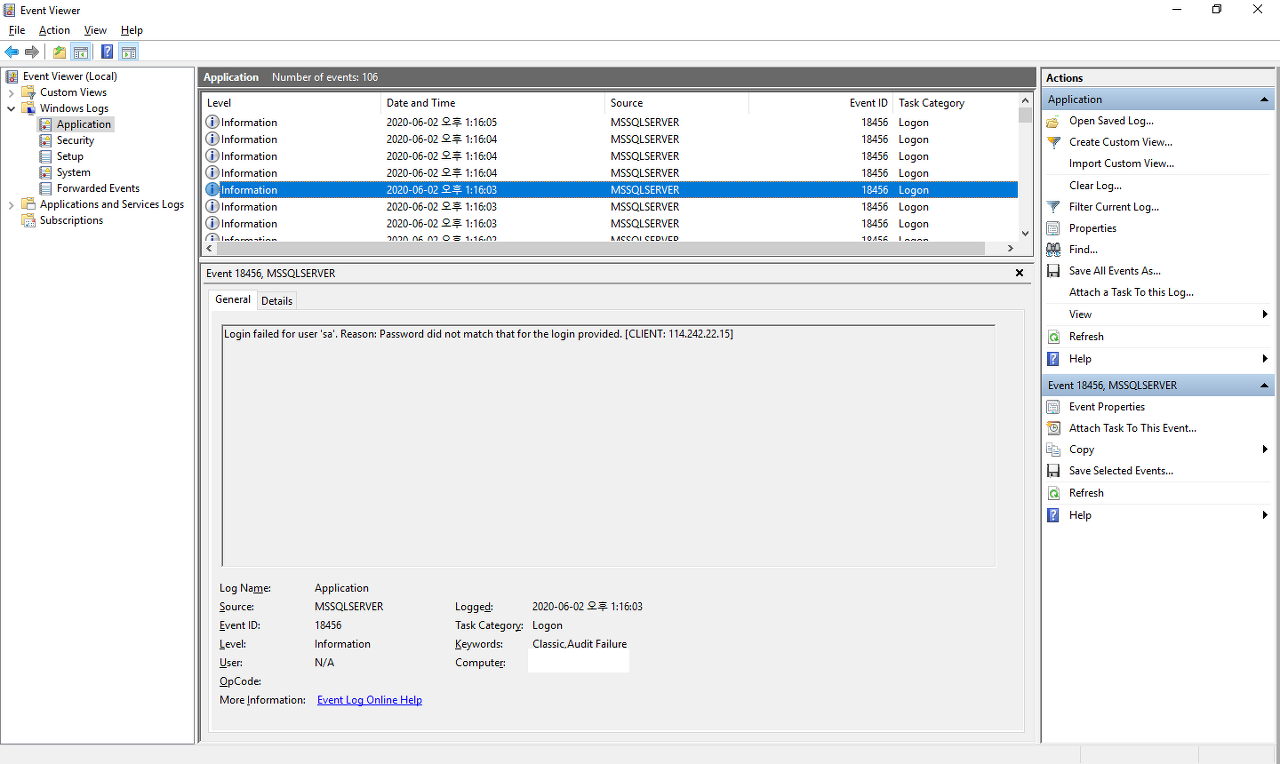
port번호를 바꾸면 일시적으로는 공격 빈도가 줄지만 시간이 지나면 다시 공격이 되살아나서 별 의미가 없습니다. 때문에 접속 가능한 IP만 제한적으로 열어두는 것이 제일 좋은데 만약 접속을 허용하는 IP만 특정할 수 없는 경우라면 해결 방법을 달리해야 합니다.
Changing the port number may temporarily reduce the frequency of attacks, but over time, the attacks will resume, making it largely ineffective. Therefore, the best approach is to restrict access to only specific IP addresses. If it is not possible to specify the exact IP addresses allowed for access, an alternative solution must be implemented.
무차별 대입 공격에 대응할 수 있는 방법이야 여러가지로 존재할테지만 그 방법중의 하나로 Ban_Server와 Ban_MSSQL을 소개하고자 합니다. Ban_Server는 Windows Server에서 원격제어를, Ban_MSSQL은 MSSQL Server의 전용port로 무단 접속을 시도하면 이와 관련된 Log를 만들때 이를 감지하고 공격자의 IP를 차단하는 역활을 수행합니다.
There are various methods to counter indiscriminate brute-force attacks, and among them, we introduce Ban_Server and Ban_MSSQL. Ban_Server detects unauthorized attempts to remotely control Windows Server and Ban_MSSQL detects unauthorized attempts to connect to the dedicated port of MSSQL Server. When creating logs related to these attempts, they perform the role of detecting them and blocking the attacker's IP address.
1. 설치방법
1. Installation Method
우선 Microsoft의 아래 homepage에서 Console Application용으로 .NET 10 Runtime을 내려받아 설치합니다.
First, download and install the .NET 10 Runtime for Console Applications from the Microsoft homepage below.
.NET 10.0 런타임 다운로드
.NET 10.0 런타임에는 기존 .NET 및 ASP.NET Core 애플리케이션을 실행하는 데 필요한 모든 것이 포함됩니다.
dotnet.microsoft.com
.NET 10 Runtime 설치를 하고 나면 아래 file을 내려 받고 file을 server의 임의폴더에 풀어줍니다.
After installing the .NET 10 Runtime, download the file below and extract it to any folder on the server.
압축을 풀고나면 Ban_Server와 Ban_MSSQL 2개의 folder가 있는지 확인하고 각각의 폴더를 원하는 위치로 옮겨줍니다. 만약 REMOTE와 MSSQL을 모두 사용할 필요가 없다면 필요한 것만 사용하고 다른건 삭제해도 됩니다.
After unzipping, verify that the Ban_Server and Ban_MSSQL folders are present, then move each folder to your desired location. If you do not need to use both REMOTE and MSSQL, you may use only the necessary one and delete the other.
이제 ask Scheduler를 등록해야 하는데 우선 Remote Desktop에 대응할 Task Scheduler부터 등록합니다. 이를 위해 Control Panel -> Administrative Tools -> Task Scheduler를 실행하여 아래 제시된 방법으로 Task Scheduler를 등록합니다.
You must now register the Scheduler. Begin by registering the Task Scheduler for Remote Desktop. To do this, run Control Panel -> Administrative Tools -> Task Scheduler and register the Task Scheduler using the method described below.

오른쪽의 Create Task를 선택합니다.
Select Create Task on the right.

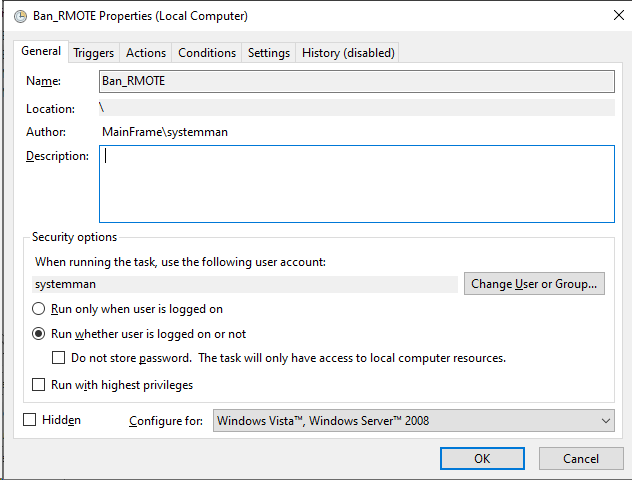
Name에 Ban_REMOTE를 입력하고 아래 Security Options에는 'Run whether user is logged on or not'을 선택합니다. 이때 Name은 해당 Task Scheduler가 어떠한 목적으로 만들어졌는지를 구분할 수 있을 정도면 다른 이름을 지정할 수도 있습니다.
Enter Ban_REMOTE in the Name field and select ‘Run whether user is logged on or not’ under Security Options. At this point, you can assign a different name to the Task Scheduler as long as it clearly indicates the purpose for which it was created.
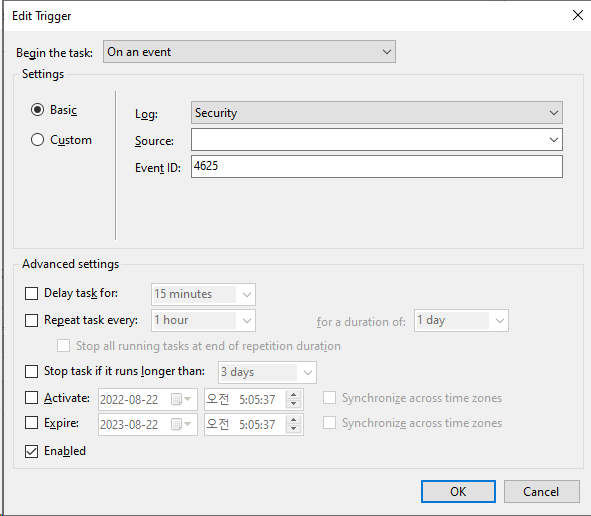
다음으로 Trigger Tab으로 이동해 Begin the task에 'On an event'를 선택하고 Log에는 Security를 Event ID로는 4625를 입력합니다.
Next, go to the Trigger tab, select ‘On an event’ for Begin the task, and enter Security for Log and 4625 for Event ID.
Actions tab에서는 Action에 'Start a program'을 선택하고 Program/script에 Ban_Server.exe를 명시한 뒤 Start in (optional)에 Ban_Server.exe가 존재하는 folder를 지정합니다.
In the Actions tab, select ‘Start a program’ for Action, specify Ban_Server.exe in Program/script, and then designate the folder where Ban_Server.exe is located in Start in (optional).

이것으로 REMOTE(Ban_Server)에 대한 Task Scheduler을 완료하였습니다. 같은 방법으로 MSSQL에 관한 event로 등록해 줘야 하는데 위의 설정과정 대부분이 동일합니다. 다만 MSSQL의 경우 Trigger에서 Log를 Application을 잡고 Event ID를 18456으로 해야 합니다.
This completes the Task Scheduler setup for REMOTE(Ban_Server). You must register the event for MSSQL using the same method; most of the configuration steps above are identical. However, for MSSQL, you must set the Application in the Trigger to Log and the Event ID to 18456.
2. 사용방법
2. How to Use
압축을 풀어놓은 folder를 보면 jsconfig.json이라는 이름의 file을 볼 수 있습니다. 해당 file을 아래 내용으로 구성되어 있습니다.
When you unzip the folder, you will find a file named jsconfig.json. This file is structured as follows:
| { "FailedCount": 1, "WhiteLists": [] } |
FailedCount는 실패한 건수에 대한 대응입니다. 동일한 IP에 대하여 설정한 횟수 이상의 접속실패건이 발생하는 경우에만 해당 IP를 방화벽에 등록하여 차단을 수행하도록 합니다.
FailedCount corresponds to the number of failures. Only when the number of connection failures exceeds the set limit for the same IP address will that IP be registered in the firewall and blocked.
WhiteLists는 Ban_Server.exe가 예외로 둘 IP를 지정하는 곳입니다.
WhiteLists is where Ban_Server.exe specifies the IP addresses to be treated as exceptions.
| { "FailedCount": 1, "WhiteLists": ["192.168.10.1", "192.168.10.2"] } |
따라서 만약 위와 같이 '192.168.10.1'과 '192.168.10.2'의 IP를 등록했다면 해당 IP에 대해서만 접속실패가 발생하더라도 차단방화벽의 IP로 등록하지 않습니다.
Therefore, if you have registered the IP addresses ‘192.168.10.1’ and ‘192.168.10.2’ as described above, even if access failures occur only for those specific IPs, they will not be added to the firewall's blocked list.
3. 기타
3. Other
Ban_Server는 Open source project이며 Git을 통해 source를 살펴보고 변경할 수 있습니다.
Ban_Server is an open-source project, and you can view and modify the source code via Git.
cliel/Ban_Server: 무차별 대입 공격 방어(Brute Force Attack Defend) (github.com)
GitHub - cliel/Ban_Server: 무차별 대입 공격 방어(Brute Force Attack Defend)
무차별 대입 공격 방어(Brute Force Attack Defend). Contribute to cliel/Ban_Server development by creating an account on GitHub.
github.com
※ 해당 프로그램 사용으로 인한 부작용에 대해서는 책임지지 않습니다.
※ We are not responsible for any adverse effects resulting from the use of this program.
※ json에서 FailedCount는 정확성을 보장하지 않습니다. FailCount를 3으로 하면 "3번 실패 시 작동한다."가 아니라 "3번 이상 실패 시 작동한다"쯤으로 해석해야 합니다. LOG를 읽고 program이 동작하는 시점에 다시 공격이 들어올 수 있는 등 여러 가지 예외 사항이 발생하므로 IP가 Block 완료될 때쯤 실제 공격은 3회 이상으로 이루어질 수 있습니다.
※ The FailedCount in JSON does not guarantee accuracy. Setting FailCount to 3 should be interpreted as “activates after 3 or more failures,” not “activates after exactly 3 failures.” Various exceptions can occur, such as attacks resuming while the program is processing logs. Therefore, by the time the IP is fully blocked, the actual attack may have occurred more than three times.
※ Ban_Server는 Windows Server상의 EventLog를 기반으로 동작합니다. Log가 많이 쌓아두면 그 만큼 처리하는데 시간이 오래 걸릴 수 있으며 Log의 관리특성에 따라 원하는 방향으로 프로그램이 동작하지 않을 수 있기 때문에 적절한 관리가 필요합니다.
※ Ban_Server operates based on the EventLog on Windows Server. If logs accumulate excessively, processing may take longer, and depending on log management characteristics, the program may not function as intended. Therefore, proper management is required.
'Server > Windows Server' 카테고리의 다른 글
| [Windows Server] 원격제어(원격데스크톱) 접속 로그 확인 (0) | 2021.12.16 |
|---|---|
| GIT원격서버 설치 / Visual Studio 연동 (0) | 2021.04.02 |
| 무차별 대입 공격 도구 (Brute Force Attack Tool) - Ban_REMOTE_MSSQL (0) | 2020.11.24 |
| [Windows Server] netstat 명령어 (0) | 2019.10.07 |
| [Windows Server] 사용자 격리(전역 가상 디렉터리 사용 안 함) 하기 (2) | 2019.08.13 |